SnoreLab alternatives: what to check before you switch
People usually go looking for a SnoreLab alternative for one of three reasons: the free version stopped doing what they needed, the subscription felt steep for a number in the morning, or they have a year of loud nights on record and still do not know what to do about them. All three are fair. SnoreLab is a good app, and this page is not going to pretend otherwise. What it will do is lay out what SnoreLab does well, what to check in anything you replace it with, and how four other apps stack up based on their own App Store listings. We make one of those apps, Snorely, so weigh our verdict accordingly.
What SnoreLab does well (credit where it is due)
It has been on the App Store since 2012, its listing says it has monitored more than 50 million nights, and it is available in 17 languages. It detects snoring, records samples or the full night, gives you a Snore Score, compares nights, and lets you log remedies and lifestyle factors to see how they affect your results. It also has a breathing-stability measure it calls BreathFlow and syncs with Apple Health. If you switch away, you are giving up the longest track record in the category. That is a real cost, and it is worth being honest about it before you look at what you gain.
What to look for in a replacement
If you are leaving, leave for something specific. These are the things to check, in the order people usually care about them once they have used a snore app for a while.
- Can you record every night without paying?This is the one that sends most people looking. Read the paywall screen, not the App Store blurb. Listings rarely say what the free tier limits, and that includes SnoreLab's.
- Does it tell you why, or only how much? A score is a diary. A ranked list of which remedy lowered the score is a plan. Check whether factors and remedies are a side feature or the point of the app.
- Can you hear what it counted? Clip playback is how you catch an app counting the fridge. Anything without it is asking for your trust.
- Where does the audio go? On-device analysis and a choice about how much audio to keep are the two things to look for.
- Does it do the extras you actually use? Apple Watch data, sleep stages, soundscapes, an alarm. Do not pay for a sleep tracker if all you wanted was a snore tracker, and the other way round.
Four alternatives, from their own listings
Snorely
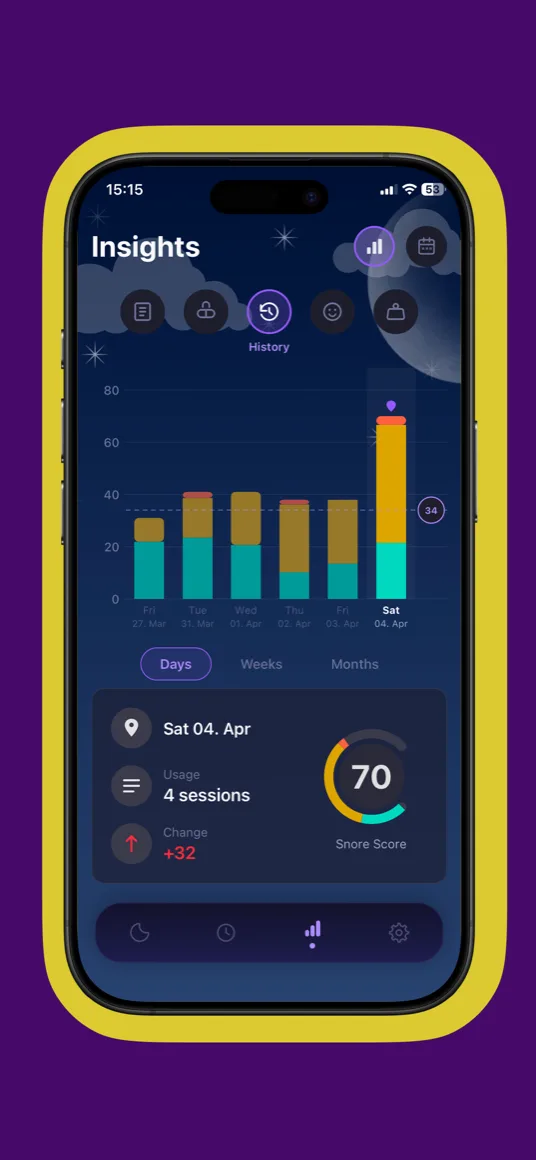
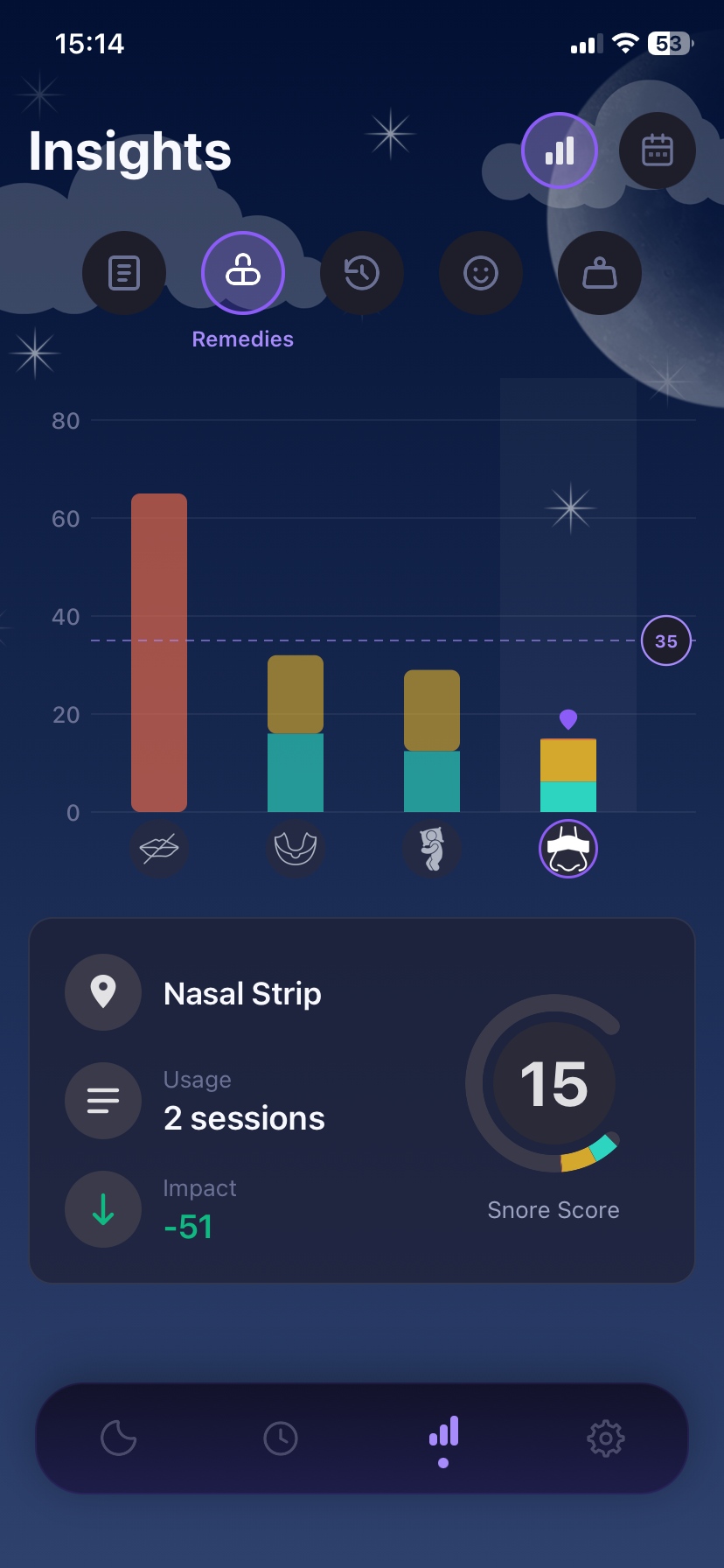
Ours, so here is the honest version. Snorely overlaps with SnoreLab on the basics: on-device snore detection, a Snore Score from 0 to 100, an hour-by-hour chart, clip playback, trends. Both apps let you log remedies and factors. The difference is what the app does with that log. Snorely ranks your remedies (nasal strips, a mouthpiece, mouth tape, anything custom) and factors (alcohol, sleep position, allergies, anything custom) by how much each one moved your score, so after a couple of weeks you have an answer rather than a diary. Other things SnoreLab users tend to notice: Smart Sampling, which keeps the detections and saves storage when you do not need the full night; soundscapes with a sleep timer that hand off to recording on their own; a PDF report for your doctor. What it does not have: BreathFlow-style breathing analysis, Apple Health sync, an Apple Watch app, or 17 languages. Free to download; premium unlocks deeper trends, unlimited history and remedy tracking.
Snollo
The privacy-first option. Acoustic analysis runs on the iPhone, the listing says raw audio is never sent to external servers, and everything is stored in your own private iCloud container. It records snoring and sleep talking, lets you review the events, and pulls heart rate, breathing rate and blood oxygen trends from an Apple Watch into a daily sleep report. Subscription with a free trial. Nothing in the listing about logging remedies or factors, so if that is why you are leaving SnoreLab, this is not the replacement.
Snore Recorder - Sleep Monitor
Worth a look if the person you are trying to help is the one next to you. Its listing leads with AI: generated soundscapes, detection of snoring, talking and shouting, and an estimate of possible apnea episodes (its own disclaimer says it is not a medical device). The distinctive feature is masking, where the app plays a sound when it hears you snore to cover it for your partner. Sleep diary, alarms, progress analytics. No remedy or factor tracking in the listing, no statement about how audio is handled, and the instructions say to keep the app open beside the bed.
Sleep Cycle
The right move if you have realised that snoring is one of several things you want to know about your sleep. It tracks sleep with sound or the accelerometer, wakes you in a light phase with a smart alarm, detects snoring, coughing and sleep talking, and shows long-term trends against global benchmarks. Sleep notes (caffeine, stress, exercise) are a light form of factor tracking; there is no remedy testing. Data export and Apple Health sync are premium. It supports Apple Watch.
Switching without losing what you have learned
No snoring app imports another app's history, so whichever way you go, your trend chart starts again. A few things make the move painless:
- Save the audio first.SnoreLab's listing says it can email your snore sound files. Export the clips that matter, especially any you might want to play for a doctor, before you cancel.
- Run both for three or four nights. Two phones are not required; two apps on one phone will each hear the room. You will see quickly whether the new app hears what the old one heard.
- Do not compare the scores directly. Every app has its own scale. A 40 in one is not a 40 in another. Compare direction: did a late drink push both up, did side sleeping pull both down?
- Log the same remedies from night one. If the reason you are switching is to find out what helps, start the log immediately. The remedies guide covers what is worth testing and in what order.
Setup does not change: phone on the nightstand, an arm's length away, plugged in. Our guide on how to record snoring on iPhone has the details, and if a partner has been doing the reporting until now, how to know if you snore covers what a recording tells you that they cannot. For the full side-by-side, including the criteria table, see best snoring apps for iPhone.
If what you want from the next app is the answer to "what actually helps", that is the question Snorely was built around. Log what you tried, sleep, and let the app do the comparing.
Frequently asked questions
Is SnoreLab free?
It is free to download, and it sells a subscription for the full feature set. Its App Store listing does not spell out what the free version limits, and those limits have changed over the years, so the only reliable answer is the one inside the app on the day you check. If the free tier is what is pushing you to look elsewhere, our comparison of the best snoring apps for iPhone lists what each listing says about its free tier.
What is the best free alternative to SnoreLab?
It depends on what you want free. With Snorely, recording a night, getting your Snore Score and seeing your first insights costs nothing; premium adds deeper trends, unlimited history and remedy tracking. Snollo is free to download with a subscription and a free trial. Sleep Cycle tracks for free and puts export and Apple Health sync behind premium. None of the listings promises unlimited free recording forever, so read the paywall before you rely on any of them.
Does Snorely have a Snore Score like SnoreLab?
Yes. Snorely gives you a Snore Score from 0 to 100 every morning, built from how much you snored and how loud it got. It is a different scale from SnoreLab's, so do not compare the two numbers directly. Compare trends instead: whether a remedy or a factor moves your score in the same direction in both apps. How to record snoring on iPhone explains where to put the phone so the numbers are worth comparing at all.
Can I transfer my SnoreLab history to another app?
Not as a history. No snoring app on the iPhone imports another app's nights, so your trend charts start again from zero wherever you go. What you can carry over is the audio: SnoreLab's listing says it can email your snore sound files, so save the clips you care about before you cancel. If any of those clips include gasps or long pauses, keep them for a doctor; the NHS page on snoring lists the signs that deserve an appointment.